Хочете будувати кар’єру в Data Science та AI? Vodafone Big Data Lab відкриває новий набір —>
Олександр КузьменкоAI Eng
12 December 2025, 17:53
2025-12-12
"We've brought the world of design and programming together". Cursor introduces Visual Editor, a vibecoding tool for designers
Startup Cursor is launching a new Visual Editor feature that lets people design web designs using artificial intelligence. The product for designers allows them to make changes to the appearance of projects using natural language and bridges the «gap between design and programming».
Startup Cursor is launching a new Visual Editor feature that lets people design web designs using artificial intelligence. The product for designers allows them to make changes to the appearance of projects using natural language and bridges the «gap between design and programming».
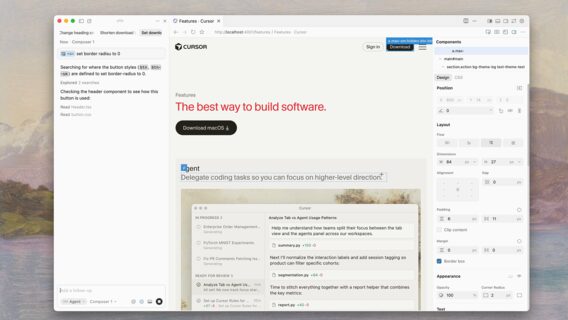
«We are excited to introduce the visual editor for Cursor Browser. It brings together your web application, code base, and powerful visual editing tools in a single window. You can drag and drop elements, inspect components and properties directly, and annotate changes with point-and-click,» the company blog says.
Cursor was an early leader in the AI programming market, but it now faces competition from OpenAI, Anthropic, and Google. The startup has historically licensed AI models from these companies, but its competitors are now investing heavily in their own AI programming products, WIRED notes. In response, Cursor has begun developing and deploying its own AI models.
«Previously, designers lived in their own world of pixels and frames that couldn’t be converted into code. So teams had to create processes to transfer tasks between developers and designers, but this was accompanied by a lot of conflict. We combined the world of design and the world of programming into one interface with one artificial intelligence agent», said Ryo Lu, head of design at Cursor.
Cursor previously released its own web browser that runs directly within its development environment. The company says the browser creates a better feedback loop during product development, allowing engineers and designers to see real user input and access Chrome-style developer tools.
Because Visual Editor runs on top of the Cursor browser, users can also point to any active site — not just their own — and inspect it as if they were inside that site’s codebase. With the feature, users can fine-tune corner radius, letter spacing, or change the direction of menu opening — left or right.
Unlike traditional design tools that rely on their own abstractions, each control corresponds to actual CSS—a programming language that tells browsers how to display visual elements on a page. This means that designers are not working with a symbolic visualization of a user interface, but with a real product for users.
«The visual editor sidebar lets you fine-tune styles using sliders, palettes, custom color markers, and a design system. Each adjustment is fully interactive: dynamic color palettes that display a preview of your selections, as well as controls for precise repositioning of grids, flexbox layouts, and typography,» Cursor notes.
The visual editor allows you to click on any interface element and describe what exactly the user wants to change. A designer can click on one element and ask it to «make it bigger» and another to «make it red.» The agents work in parallel, so changes start to take effect «in seconds.»
With Visual Editor, Cursor could start competing with products from Adobe or Figma, but the company believes that the market is large enough to support different approaches, and software creation becomes more accessible to people working in different fields.