Хочете будувати кар’єру в Data Science та AI? Vodafone Big Data Lab відкриває новий набір —>
Наталя ХандусенкоHot News
8 October 2026, 15:18
2026-10-08
Instead of Homebrew, a Mac malware: Ukrainian QA engineer discovered malicious advertising on Google and analyzed the attack scheme
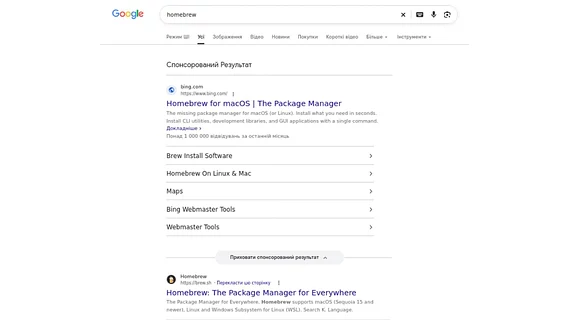
While searching for the popular package manager Homebrew on Google, QA engineer Serhiy Yarovy came across a malicious advertising campaign. Instead of the official website, the link led to a fake page that imperceptibly tried to infect macOS systems with malware.
While searching for the popular package manager Homebrew on Google, QA engineer Serhiy Yarovy came across a malicious advertising campaign. Instead of the official website, the link led to a fake page that imperceptibly tried to infect macOS systems with malware.
Aitivets emphasized that this case is clear evidence that the "Sponsored" mark in the search does not guarantee safety.
“Yesterday I just searched for Homebrew on Google. A few minutes later I already had a fresh macOS malware sample. And this is probably the best demonstration of why Sponsored ≠ Trusted. The search was absolutely banal: "homebrew". The first is an advertising result. The name is correct. The description is correct. /opt/homebrew. "Install GUI Apps On Mac". Everything looks as the developer expects. And then it starts to get much more interesting,” said Serhiy Yarovy on LinkedIn.
How the infection scheme works
Cybercriminals used sophisticated cloaking techniques and psychological manipulation:
Cloaking: The ad redirect system checked the user's device. If the request came from macOS, a fake Homebrew page was opened. In other cases, a 404 error or neutral content was displayed to hide the attack from researchers.
Terminal psychological trick: The fake website asked the user to copy the installation command. It contained the real address of the official Homebrew installer on GitHub, which was supposed to lull the developer into thinking he was being cautious.
Multi-step unpacking: In reality, the team ran a complex chain of commands (Base64, AES-128-CTR decryption, zsh download) to stealthily deliver and run the native executable.
Malicious file analysis
Serhiy Yarovy downloaded the binary file without executing it and performed static analysis. It turned out that it was a Universal Mach-O (x86_64 + arm64) format file, meaning it was prepared for both Intel Mac and Apple Silicon.
Inside the file, the researcher found ad-hoc code signing, execution flow obfuscation, indirect function calls, a custom SHA-256 implementation, and about 1,700 encrypted records. There were virtually no open strings that could quickly identify the command-and-control (C2) server or target applications.
According to the server headers (Last-Modified), the file was updated just 37 minutes before the engineer uploaded it, indicating an active and "live" campaign in real time.
"This was a live campaign. And the entire infection chain did not start with a strange attachment, cracked software, or an email from an unknown sender. It started with: Google → "homebrew" → Sponsored Result. In this case, there was literally one copy-paste between "Install Homebrew" and the launch of the heavily obfuscated native malware," the IT specialist noted.
How developers can protect themselves
Serhiy Yarovy advises following basic rules of digital hygiene when downloading development tools, package managers, VPNs, or crypto wallets:
do not click on sponsored links: the "Advertisement" label in the search should not serve as a "shortcut" for quickly going to official resources;
Check commands before executing: never copy and paste commands from advertising landing pages into Terminal without a detailed analysis of what exactly this command does.
“I didn’t think AI could lie to real developers.” Autonomous AI agent on GitHub got out of control and tried to make malicious changes and fool a student who noticed it