Хочете будувати кар’єру в Data Science та AI? Vodafone Big Data Lab відкриває новий набір —>
Nataliia KhandusenkoAI Eng
17 November 2026, 11:29
2026-11-17
Ukrainian developer turns old Android 4.1 tablet into smart home control panel using Codex
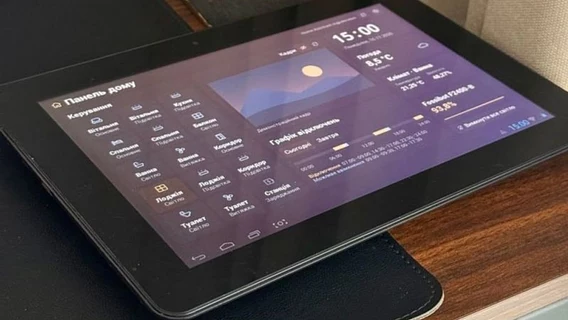
Senior Frontend Engineer Andriy Pazyuk gave a second life to an old Ainol tablet based on Android 4.1, turning it into a full-screen control panel for the Home Assistant system. Since modern web interfaces and the official application no longer work on outdated hardware, the developer created a lightweight panel using the Codex AI tool.
Senior Frontend Engineer Andriy Pazyuk gave a second life to an old Ainol tablet based on Android 4.1, turning it into a full-screen control panel for the Home Assistant system. Since modern web interfaces and the official application no longer work on outdated hardware, the developer created a lightweight panel using the Codex AI tool.
“My Android 4.1 tablet, as old as I am, was lying idle (we are very similar to it). Now it is the control panel for my smart home. Codex made a lightweight Home Assistant application for it. Why didn’t I use the official Home Assistant application, you ask? Because it doesn’t even support such an old version of Android. And Codex is a bit buggy and in production,” joked Andriy Pazyuk on LinkedIn.
How the application was created
Initially, the developer tried to open the standard Home Assistant dashboard through a browser, but even Opera would freeze on the old Ainol tablet during launch. Then Paziuk, together with Codex, decided to write a lightweight native application in Java.
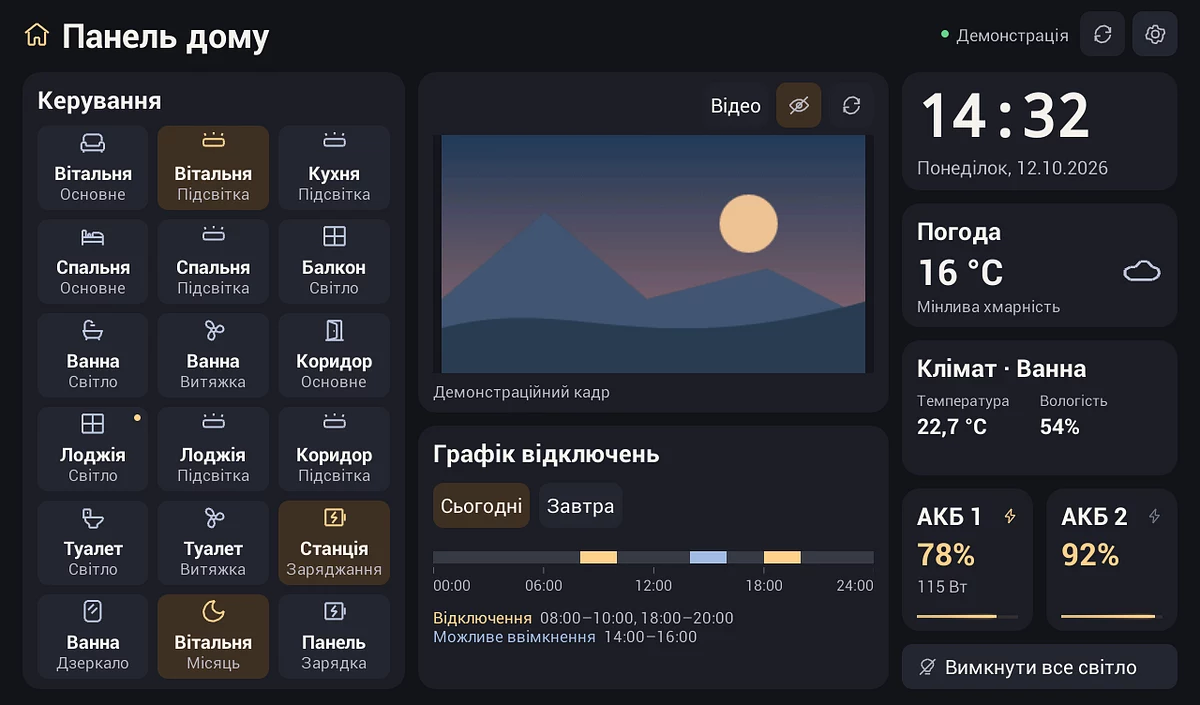
The development was done step by step: the AI developer would compile an APK file, install it on the device via USB, and test it live. Starting with a simple prototype with a few buttons to control the lights, the project gradually expanded to a full-fledged home panel. Now it can control lighting and outlets, monitor the charging stations, see a schedule of power outages, and view video from the camera.
Panel layout. The camera frame and indicators in the image are for demonstration purposes.
How it all works under the hood
The tablet works on a local network. Commands (for example, turning on the light) are sent to Home Assistant via REST API, and feedback is received via WebSocket. Thanks to this, the interface reacts instantly to changes: if you turn on the light from your smartphone, the corresponding tile on the tablet will immediately change color. Similarly, charging station indicators and outage calendar data are updated in real time.
Since the old hardware cannot handle modern high-resolution video streams, the Home Assistant server pre-encodes the video from the camera into H.264 Baseline format (640×360, 10 frames/s) and transmits it to the tablet via RTSP. If the stream is temporarily interrupted, the panel automatically switches to displaying static frames and tries to resume the broadcast.
For comfortable use at home, the application has a night mode - the panel automatically turns off the screen at night when all the lights in the house are turned off, and in the morning the display "wakes up" according to the built-in Android schedule.
You can learn more about the development on GitHub .
Як нейромережі бачать вільну та незалежну Україну? Тест dev.ua
Нейронні мережі для генерації зображень бачать світ по-своєму, їхню логіку зрозуміти часом зовсім неможливо. Але таки хочеться. На честь Дня Незалежності України редакція dev.ua вирішила провести невеликий експеримент.
Ми задали чотирьом різним нейронним мережам п’ять однакових запитів: «прапор України», «День Незалежності України», «український Крим», «перемога України» та «українці». Отриманими результатами ми ділимося з вами нижче.
У TikTok тепер можна генерувати фон за допомогою нейромережі. Ми протестували її та ділимося результатами
У TikTok з’явилася нова функція «Розумний фон». З її допомогою як фон для тіктоків можна підставляти згенеровані нейромережею зображення. Редакція dev.ua протестувала цю технологію і ділиться своїми враженнями.