Наталя ХандусенкоGadgets
22 May 2026, 16:38
2026-05-22
Philips introduces a two-sided monitor: the perfect solution for presentations, collaboration and saving desk space
Philips seems to have just unveiled one of the strangest, yet most useful, monitors ever. While its specs are fairly modest, the unique dual-screen configuration could be ideal for certain business scenarios. However, there is no information on pricing or global availability at this time.
Philips seems to have just unveiled one of the strangest, yet most useful, monitors ever. While its specs are fairly modest, the unique dual-screen configuration could be ideal for certain business scenarios. However, there is no information on pricing or global availability at this time.
The dual-sided monitor, labeled 24B2D5300, recently appeared on Philips' websites in the UK and Ireland. The new product will go on sale in June for $481, but the pre-order option is currently not available in any region, TechSpot reports .
The monitor is clearly positioned primarily as a business solution, as it features two oppositely facing 24-inch IPS panels with a resolution of 1080p. Despite this, the 120Hz refresh rate can be useful for PC games or watching sports broadcasts. Philips emphasizes the latter in a YouTube video, and the user manual confirms that the monitor supports variable refresh rate (VRR) using AMD Adaptive Sync technology. While the manual's VRR section provides an extensive list of compatible AMD GPUs and hybrid processors, support for Nvidia GeForce cards is currently in question.
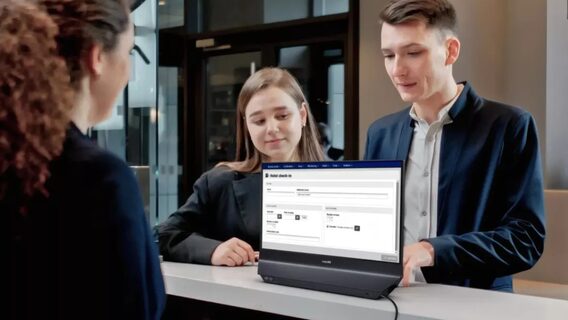
Reception work and presentations are exactly the areas where the device's unique design is likely to prove its worth. Multiple display modes allow users to control what appears on each screen. This allows them to show information to people across from them while still looking at their work monitor. In addition, the monitor can be rotated 180 degrees and duplicate content on both sides.
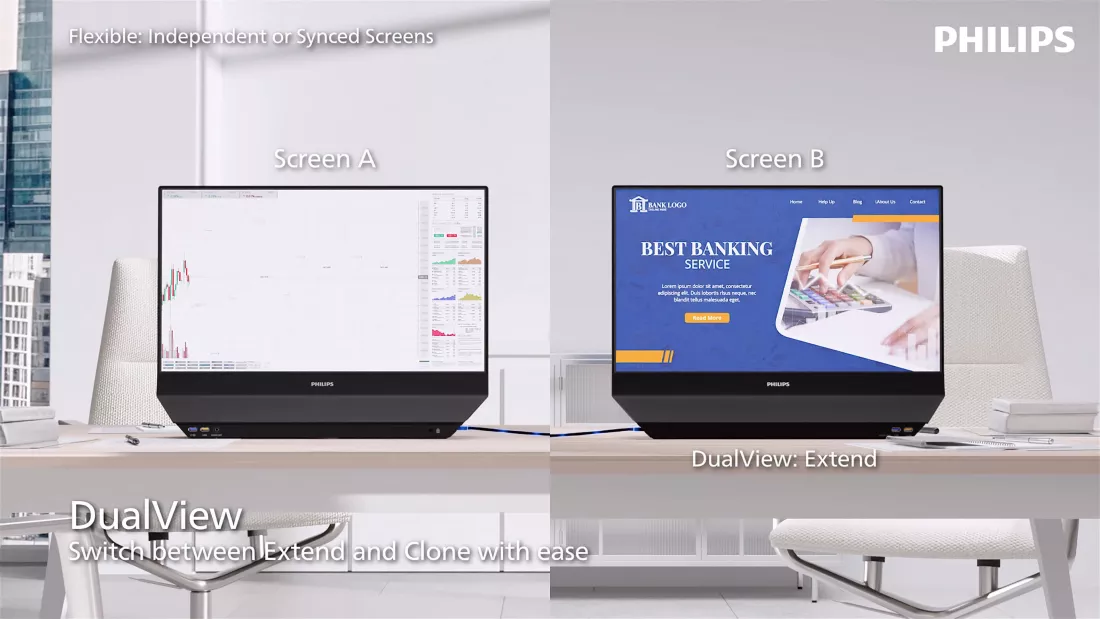
In DualView mode, it essentially works like a standard dual-monitor setup, except the screens are connected by backplanes. Users can extend their desktop and drag windows between displays just as they would between two separate monitors.
However, another mode called SmartView activates a split-screen feature on one side. The combination of SmartView and DualView allows users to split one monitor in half, while extending the desktop to control content displayed on the opposite display. Meanwhile, OSD Sync (On-Screen Display) lets you adjust display settings on both screens simultaneously.