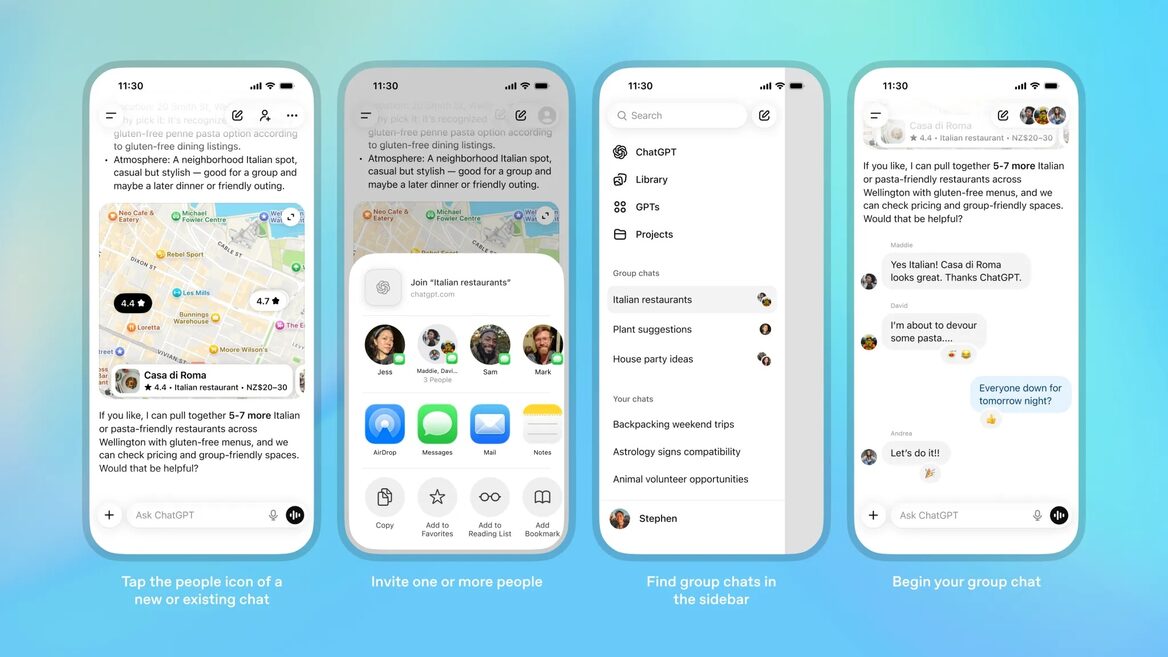
A few days ago, ChatGPT allowed you to create group chats. Generative AI consultant Alexey Minakov explained how it works.
«This was sorely lacking. Especially for businesses. Because there were no opportunities for employees to work together in ChatGPT, unless you have an Enterprise tariff for all the money in the world. Therefore, this is a very useful new feature — be sure to test it out,» he noted.
Here are 10 key features of the new tool.
Now you can brainstorm, discuss ideas, solve problems, share context, conduct collective research, and collaborate on a single project with other users in the same chat.
There can be up to 20 people in a group chat.
To add people to a group chat, you need to send them a link to the group chat. Anyone can join the group chat and see previous messages using this link.
Adding people to an existing chat creates a copy of the original conversation as a new group chat. The previous chat without other users will remain separate in the «Your Chats» section.
Anyone in the group can share the link to invite others. And any member can remove another, except the chat creator.
By default, the AI will automatically respond in chat as needed if someone asks a question or asks for help. Or you can turn it off in the settings, and then it will only work if you specifically call it (tag it with @).
You can configure ChatGPT for each group chat by writing down special instructions for it to take into account.
Currently, there is no voice mode, deep research, Canva, Python/Data Analysis, tasks, collectors, agent mode in group chats.
You can react to ChatGPT messages with emojis. It’s a small thing, but why not put a heart or a light on a useful ChatGPT response to mark it. ChatGPT can also react to messages with emoticons.