Промо на dev.uaGadgets
31 July 2026, 10:32
2026-07-31
How to reduce the strain on your shoulders and back while working on a laptop?
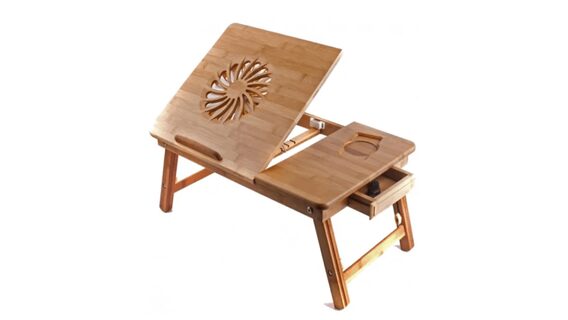
After 40-60 minutes of working on a laptop, your neck, shoulders, and wrists often become strained because the screen is low and your hands are reaching for the keyboard at an awkward angle. Practical laptop stands help elevate your device, provide support for your hands, and free up space for your mouse. This accessory is especially useful for people who work or study from home.
After 40-60 minutes of working on a laptop, your neck, shoulders, and wrists often become strained because the screen is low and your hands are reaching for the keyboard at an awkward angle. Practical laptop stands help elevate your device, provide support for your hands, and free up space for your mouse. This accessory is especially useful for people who work or study from home.
Screen height and elbow position while working: what you should know?
It is best to position your laptop screen so that the top third is close to eye level. Before working, it is worth checking the following nuances:
table height - allows you to work without leaning forward or raising your shoulders;
the surface is wide enough for a laptop and does not force you to place it on the edge;
stability - the design does not wobble when typing or moving the mouse;
a place for the mouse - there is a separate area where the hand does not hang down or slide on a soft surface;
ventilation - there is space under the laptop for air circulation.
This approach helps you quickly understand whether the table really improves your posture. If the keyboard is too high after raising the screen, it is often more convenient to add separate accessories.
Additional criteria to consider
Stability is important for typing, video calling, and working with documents. If the surface sags or wobbles, your laptop will shift and your hands will be constantly strained.
For 15-16 inch models, it is worth choosing a wider tabletop so that the case does not stand on the very edge. For compact 13-14 inch laptops, a smaller area is usually enough.
Material affects weight and maintenance. Plastic is lightweight and easy to move between rooms, but may be less stable under a heavy laptop. MDF or wood are denser and hold their shape better, but add weight. Metal elements are useful for the strength of the legs and adjustment mechanisms.
Adjusting the angle is useful for reading, video conferencing, and working with documents, but tilting too far can cause the laptop to slide off. In this case, a front edge or stopper is needed. Locking legs are also important for beds and sofas, as a soft base makes the structure less stable.
A laptop table should improve your posture: raise the screen, support your hands, leave room for your mouse, and not block ventilation. For home use, it's best to choose a model that fits your laptop's diagonal, the device's weight, and your usual work space.
You can view convenient options in the COMFY online store. Go to comfy.ua to compare prices and product specifications, read reviews from other users, and place an order.