OpenAI's ChatGPT Atlas browser gets an update
The Chromium-based ChatGPT Atlas browser is testing a new feature, likely called Actions. It also has the ability to understand video content — so you can see ChatGPT creating timestamps for videos.


The Chromium-based ChatGPT Atlas browser is testing a new feature, likely called Actions. It also has the ability to understand video content — so you can see ChatGPT creating timestamps for videos.

The Chromium-based ChatGPT Atlas browser is testing a new feature, likely called Actions. It also has the ability to understand video content — so you can see ChatGPT creating timestamps for videos.
ChatGPT Atlas is a web browser that has ChatGPT built right into the interface. Instead of switching between tabs and copying links or screenshots into ChatGPT, you can ask questions and get help right on the page you're viewing.
It understands what you see on your screen, helps with research, explains complex things, and performs tasks directly as you browse websites. Atlas can also remember context if you enable the "browser memory" feature. This allows it to reproduce useful details from previously visited sites, such as job terms and conditions for comparison.
There's also an "agent mode" that can open tabs and switch between workflows for you, with security restrictions and extra caution on sensitive sites.
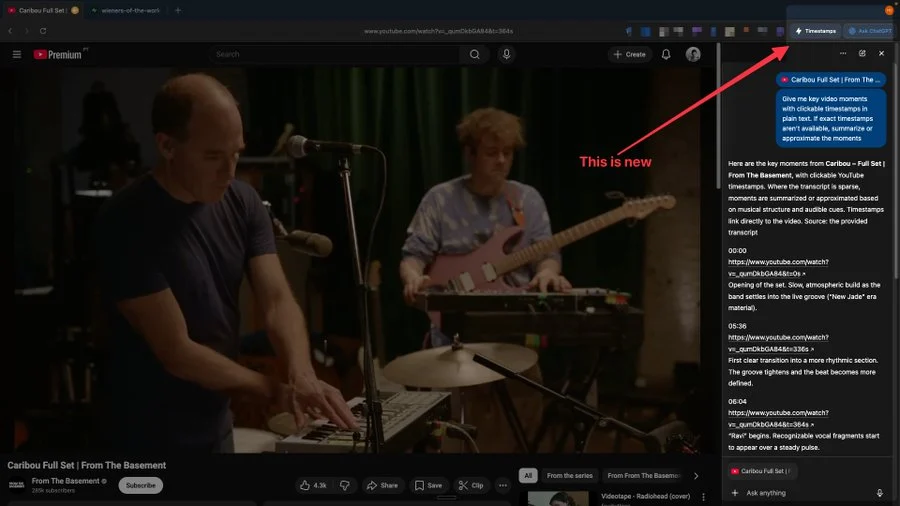
As X users have noticed, ChatGPT's browser now seems to be able to understand videos, including YouTube videos. Some have noticed that Atlas now has a "Timestamps" button that allows artificial intelligence to transfer YouTube timecodes directly to the sidebar, writes Bleeping Computer.
In the release notes, OpenAI confirmed the recent release of an update that focuses on stability and smoothness in daily operations.
In particular, a bug causing excessive memory consumption has been fixed, and improved suggestions for next questions ("what to ask next") have been added, which are displayed even when the Ask ChatGPT sidebar is closed.
The update brings a lot of neat little things to improve your tab, search, and overall UI experience. Tab Search now shows the last five tabs if the search bar is empty, and can be invoked with the Cmd+K keyboard shortcut.
OpenAI also plans to release Atlas for Windows 11.