Хочете будувати кар’єру в Data Science та AI? Vodafone Big Data Lab відкриває новий набір —>
Наталя ХандусенкоAI Eng
19 August 2026, 15:17
2026-08-19
A developer used AI to create a macOS driver for an outdated printer that only works with Windows
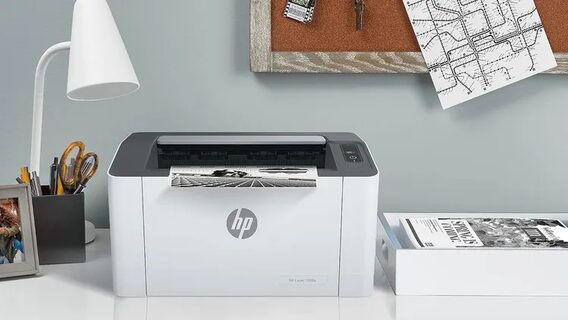
A developer named Kuberwastaken has created a full-fledged macOS driver using Claude Code to bring the HP Laser 1008a series printers back to life. These devices were designed exclusively for Windows, and HP never released working software for them under Apple's system. The developer was helped by the AI assistant Claude Code to write the necessary code.
A developer named Kuberwastaken has created a full-fledged macOS driver using Claude Code to bring the HP Laser 1008a series printers back to life. These devices were designed exclusively for Windows, and HP never released working software for them under Apple's system. The developer was helped by the AI assistant Claude Code to write the necessary code.
A developer from India shared his project on GitHub .
What was the problem?
The HP Laser line of models (specifically the 1003, 1006, and 1008) are essentially rebranded Samsung printers with SPL3 technology. They don't support standard protocols (like AirPrint or PostScript), so the Mac simply doesn't "see" them as a full-fledged printing device.
How it works
To get around the limitations, the developer used HP's original decoder for Linux and packaged it into a compact Linux container. This container runs in the background and broadcasts print commands over USB.
Thanks to this, the Mac perceives the device as a regular printer: you can print from any application using the standard Cmd+P key combination without using the command line during daily work.
Configuring the driver is very simple and only takes one time: the user just needs to have the Homebrew package manager installed, open the Terminal application, paste the special command from GitHub, and enter their Mac password for confirmation. After that, the system will automatically configure everything, the device will appear in the list under the name "HP Laser 1008a", and you can immediately print from it from any application using the standard Cmd-P key combination.
AI assistant Claude Code acted as a full-fledged co-developer who, together with the author, went through the entire complex technical path to solve the problem.
"It all started with 'install drivers', then the universal driver hung on the connection to the device, then we figured out the printing language from the printed error pages of the printer itself, bypassed the USB sandbox in macOS to interact directly with the device, ran the real HP rastertospl codec in a Linux container to create a real SPL3, configured a background daemon that is resistant to reboots, and finally released a ready-made installer with an MIT license that runs with a single command."
Now the driver works so well that it allows you to "print from macOS on Apple Silicon as if it were a regular printer. Press CMD-P in any program and you're done. No terminal, no additional scripts for each print."
Як нейромережі бачать вільну та незалежну Україну? Тест dev.ua
Нейронні мережі для генерації зображень бачать світ по-своєму, їхню логіку зрозуміти часом зовсім неможливо. Але таки хочеться. На честь Дня Незалежності України редакція dev.ua вирішила провести невеликий експеримент.
Ми задали чотирьом різним нейронним мережам п’ять однакових запитів: «прапор України», «День Незалежності України», «український Крим», «перемога України» та «українці». Отриманими результатами ми ділимося з вами нижче.
У TikTok тепер можна генерувати фон за допомогою нейромережі. Ми протестували її та ділимося результатами
У TikTok з’явилася нова функція «Розумний фон». З її допомогою як фон для тіктоків можна підставляти згенеровані нейромережею зображення. Редакція dev.ua протестувала цю технологію і ділиться своїми враженнями.