Хочете будувати кар’єру в Data Science та AI? Vodafone Big Data Lab відкриває новий набір —>
Наталя ХандусенкоAI Eng
3 July 2025, 14:24
2025-07-03
Gemini Gem bots now available in Google Docs, Sheets, and Gmail
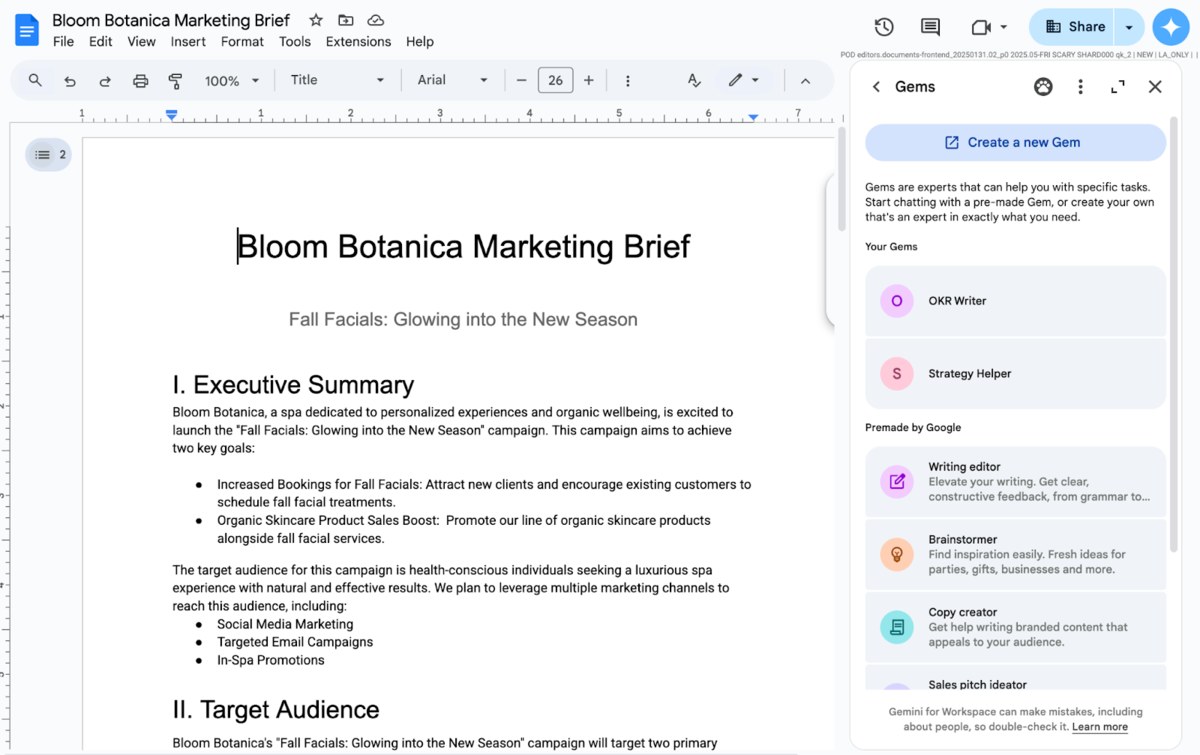
Workspace users now have access to Gems, custom AI bots that can be customized to suit their needs. Gems are now available directly in the sidebar of Google Docs, Slides, Sheets, Drive, and Gmail without having to switch between apps.
Workspace users now have access to Gems, custom AI bots that can be customized to suit their needs. Gems are now available directly in the sidebar of Google Docs, Slides, Sheets, Drive, and Gmail without having to switch between apps.
Gemini users can customize chatbots to perform specific tasks, such as brand-specific copywriting or exam preparation. They can also upload their own files to Gems to provide context and resources for specific tasks.
Additionally, Google provides ready-made Gems for things like editing text, writing code, generating ideas for sales presentations, and more.
Google provided examples of how Workspace users can use Gems:
for copywriting to create content adapted to the target audience, pre-loaded into the chatbot;
create a Gem that assists in sales interactions based on information for a specific company, prospect, or industry;
use a bot tailored to a specific position to help provide more relevant summaries and content for internal communications;
Create a bot to review content from a specific person, such as a manager, which can then help create compelling messages.
Gems were previously only available in the Gemini app. You can’t create your own Gems directly in Workspace apps, but users can do so by going to gemini.google.com/gems/create or by clicking the “Create a new Gem” option in the Workspace sidebar. Workspace features like @mentions and file/folder access are supported by both custom and pre-built Gems, The Verge reports .
The Gems update is available to all Google Workspace users who have access to Gemini in the Workspace app sidebars.
This rollout began on July 2, but Google says it may take more than 15 days for the feature to be available to everyone.