Хочете будувати кар’єру в Data Science та AI? Vodafone Big Data Lab відкриває новий набір —>
Наталя ХандусенкоAI Eng
30 October 2026, 08:01
2026-10-30
GitHub Introduces Copilot Fusion: Automatic Selection and Combination of AI Models for Writing Code
GitHub has announced the release of Copilot Fusion, a real-time intelligent router and model orchestrator that automatically selects the optimal AI models and execution patterns for specific coding tasks.
GitHub has announced the release of Copilot Fusion, a real-time intelligent router and model orchestrator that automatically selects the optimal AI models and execution patterns for specific coding tasks.
The feature is now publicly available on all Copilot plans. It allows developers to pass a selection of algorithm models, resulting in a single ready-made answer. Fusion can be used in Visual Studio Code, Copilot CLI, the official GitHub Copilot app, and JetBrains IDEs, Cyber Press reports .
Instead of manually selecting a specific language model, the developer simply selects Fusion from the model selection menu. The system independently analyzes the reasoning, code generation, debugging, and tooling requirements, then determines the required models and level of in-depth analysis.
Orchestration also takes into account the current state and availability of systems in real time, and transitions between models are tied to caching limits or significant changes in the complexity of the dialogue context.
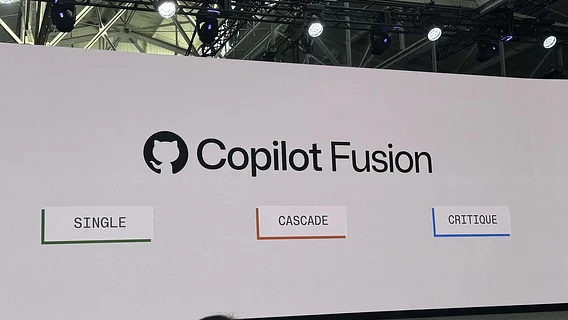
Three Execution Patterns Fusion supports three main scenarios: Single: Assigns a single model to perform the entire task. Cascade: Starts with a faster and more efficient model, then a model evaluator (“judge”) reviews the draft and decides whether to accept the result or pass the task on to a more powerful model. Critique: Involves parallel review. One model creates a draft solution, and several others independently analyze it. The system aggregates the feedback, and then the original model refines the answer. Execution patterns can change from request to request within a single session. This allows for a lightweight approach for a simple request and complex orchestration for subsequent refinement.
Three execution patterns
Fusion supports three main operating scenarios:
Single: assigns one model to perform the entire task;
Cascade: starts with a faster and more efficient model, after which a model evaluator ("judge") checks the draft and decides whether to accept the result or pass the task on to a more powerful model;
Critique: Involves parallel review. One model creates a draft solution, while several others independently analyze it. The system aggregates the feedback, after which the original model refines the response.
Execution patterns can vary from request to request within a single session. This allows you to take a lightweight approach for a simple request and involve complex orchestration for subsequent refinement.
Load levels and work characteristics
GitHub notes that Fusion only invokes additional model calls when necessary. Cascade and Critique modes take longer due to the validation steps, while Single runs at the normal speed of a single query.
Developers can track which models participated in the execution, but only the final answer is displayed in the final window - intermediate drafts can be edited or rejected.
Several difficulty levels are available to choose from:
Fusion Standard — balances cost, quality, and latency by choosing one model for the task.
Fusion High is designed for large-scale tasks with a clear context (complex bug fixes, changes to multiple files).
Fusion Max — prioritizes the deepest possible reasoning.
Fusion Fast is optimized for latency-sensitive tasks (like quick tips in VS Code's code line) and is not manually selected.
Additionally, routing to local models is now available in public preview within Fusion Standard. MAI Code 1.1 Flash is available on supported Windows systems, and Qwen3.8 Flash Next is available via Copilot CLI (Windows, macOS, Linux). Experimental settings may need to be enabled for operation.
Security, integration and payment
For enterprise security teams, the administrative rules remain the same. Fusion automatically excludes models that are not available through subscription or are blocked by the administrator (for example, due to data placement restrictions, FedRAMP compliance, or assessment model). If there are no models left available, Fusion will not appear in the selection list.
An important operational nuance: canceling or rejecting an AI draft does not automatically undo any edits that the draft has already made to the workspace. GitHub strongly recommends that you review all changes before committing. Fusion also operates separately from subagents and does not trigger their auto-deployment.
Payment is charged for actual models used, with no separate fee for Fusion itself. High-inference modes may consume more AI credits due to multiple models. Paid subscribers receive a 30% discount on model costs in Copilot Fusion until November 30, 2026.
Як нейромережі бачать вільну та незалежну Україну? Тест dev.ua
Нейронні мережі для генерації зображень бачать світ по-своєму, їхню логіку зрозуміти часом зовсім неможливо. Але таки хочеться. На честь Дня Незалежності України редакція dev.ua вирішила провести невеликий експеримент.
Ми задали чотирьом різним нейронним мережам п’ять однакових запитів: «прапор України», «День Незалежності України», «український Крим», «перемога України» та «українці». Отриманими результатами ми ділимося з вами нижче.
У TikTok тепер можна генерувати фон за допомогою нейромережі. Ми протестували її та ділимося результатами
У TikTok з’явилася нова функція «Розумний фон». З її допомогою як фон для тіктоків можна підставляти згенеровані нейромережею зображення. Редакція dev.ua протестувала цю технологію і ділиться своїми враженнями.