The Air Alert application has a new authorization method for viewing air targets
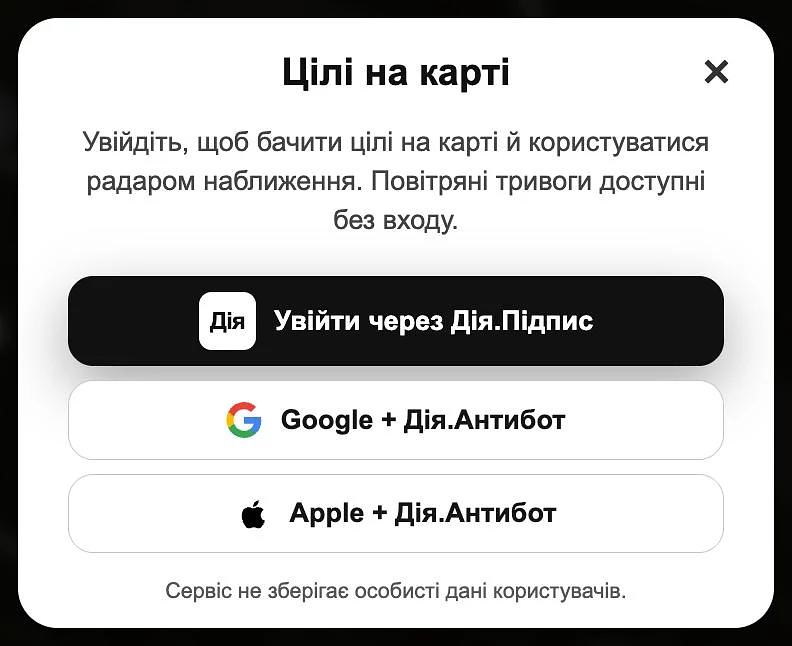
The developers of the "Air Alarm" application have added a new method of user verification: in addition to "Action.Signature", you can now log in using email and the "Action.Antibot" service.
The developers of the "Air Alarm" application have added a new method of user verification: in addition to "Action.Signature", you can now log in using email and the "Action.Antibot" service.
"Diya.Antibot" is a tool from "Diya" that checks the presence of the application on the user and helps filter out automated bots without the need to apply an electronic signature, the "Air Alert" team reports .
How to complete a new authorization:
Open the map in the application and click on the "shaheda" icon at the top of the screen.
Log in with your email (via Google or Apple account).
Confirm your login to the "Diya" application, where the system will redirect you automatically (you do not need to use "Diya.Signature" in this case).
After confirmation, the user will automatically be returned to the "Air Alert", where the target display will open.
The team recalled that mandatory authorization for access to data on the movement of air targets was introduced at the request of the Air Force of the Armed Forces of Ukraine. This mechanism ensures that only verified users can view sensitive information.