Хочете будувати кар’єру в Data Science та AI? Vodafone Big Data Lab відкриває новий набір —>
Олександр КузьменкоGameDev Eng
5 March 2026, 15:41
2026-03-05
The "DO NOT PLAY" extension, which labels Russian games, has become available directly on Steam
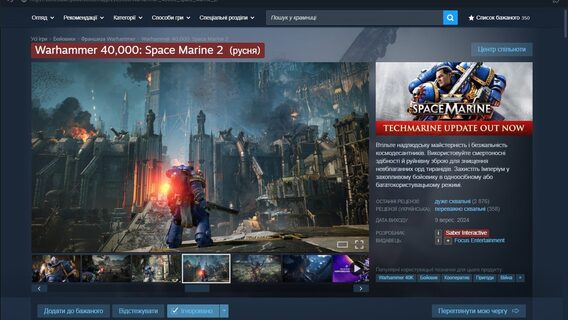
Denis Klevanny, the author of the Telegram channel «GRAY» dedicated to video games, added the ability to integrate the «DO NOT GRAY» browser extension into the Steam application.
Denis Klevanny, the author of the Telegram channel «GRAY» dedicated to video games, added the ability to integrate the «DO NOT GRAY» browser extension into the Steam application.
Previously, the «DO NOT PLAY» extension, which marks Russian studios and publishers on the game’s Steam page, was available for Chrome, Opera, Edge, and Firefox browsers. Now it’s possible to use the extension directly in the Steam client on PC.
«I figured out Millenium, so the Ukrainian and Russian developer markings are now available directly in the Steam client. It turned out to be quite simple: we install Millenium, then the Extendium plugin, through it we load my extension, and make one important quick fix,» said Klevanny.
Millenium is an open-source low-code modding platform designed to create, manage, and use themes and plugins in the Steam desktop application without programming skills.
Instructions on how to add «DO NOT PLAY» directly to Steam
Add the Extendium plugin: Steam -> Millenium -> Plugins -> Install plugin, where you need to enter the code 788ed8554492
Enable the plugin, save the changes, restart Steam, and open Extendium using the puzzle icon at the top of the store window.
Select Manage Extensions -> Install Extension -> paste the extension link .
After installation, you need to go to the Steam\plugins\extendium\.extensions folder and find the folder named %D0%BF%D0%BE%D0%… (the extension «DO NOT PLAY»). For the extension to work, you need to rename the folder to Latin characters (for example, call it hrai) and restart Steam.
Previously, the «DO NOT PLAY» extension featured the «PLAY» module, which marks games from Ukrainian developers on Steam. By default, Ukrainian games are marked green, and Russian ones are marked red. In the settings, users can change the colors or disable the category. Currently, the extension database includes over 540 Ukrainian developers and 2,200 Russian ones.










Доброго дня. Не можливо зробити крок 4, бо посилання не дійсне. Чи не могли б ви його оновити?