OpenAI taught ChatGPT to view open tabs in the Chrome browser
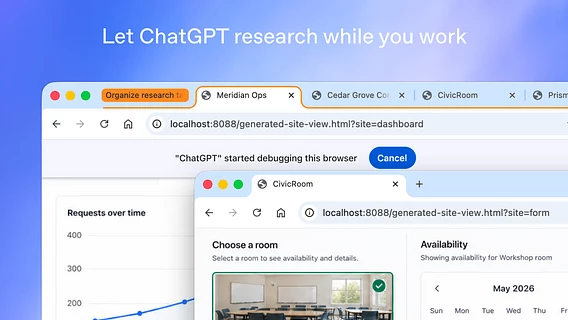
The ChatGPT extension for Google Chrome has received an update that allows artificial intelligence to interact with open tabs in the browser, compare data, and assist with everyday tasks.


The ChatGPT extension for Google Chrome has received an update that allows artificial intelligence to interact with open tabs in the browser, compare data, and assist with everyday tasks.
The ChatGPT extension for Google Chrome has received an update that allows artificial intelligence to interact with open tabs in the browser, compare data, and assist with everyday tasks.
The Verge reports that with this extension, the assistant has the ability to view the user's tabs during requests via the web or desktop application. OpenAI demonstrated the function using the example of comparing several open pages of online furniture stores to find the right options.
A few big upgrades for Chrome users today! We're bringing the power of computer use to anyone who uses Chrome. First up: ChatGPT can now use your tabs in Chrome to make answers more useful and get things done for you. If you're in Chat, it can look across your open tabs and gather info. If you're in Work, ChatGPT can control your Chrome tabs to get things, like sending messages, filling out forms, or downloading files. It can even help you organize and group that pile of tabs you have open.
— ChatGPT (@ChatGPT) October 15, 2026
The update also affected the ChatGPT sidebar, where full model functionality and conversation history are now available in Chat or Work modes without having to leave the current page. In particular, the ChatGPT Work tool has received tab management capabilities: it can automatically fill out forms, send messages, upload files, and group and organize open pages. Similar solutions have been implemented by other developers before, in particular, the auto-browsing feature based on Google's Gemini.
Next up: using ChatGPT right within a Chrome tab got a major upgrade — the full power of ChatGPT is now in your browser. Your entire ChatGPT history is right there, and you can ask questions in Chat or get things done in Work — side by side while you're on a site. https://t.co/ABiwzLvNnD
— ChatGPT (@ChatGPT) October 15, 2026
Previously, the company planned to release a separate browser called ChatGPT Atlas, but later changed priorities in favor of integration into existing platforms and expanding the capabilities of web clients.