Хочете будувати кар’єру в Data Science та AI? Vodafone Big Data Lab відкриває новий набір —>
Марія БровінськаStartup
9 July 2026, 12:40
2026-07-09
Ukrainian designer created a Quark application for saving links: Ukrainian localization, Pinterest, Instagram and Bluesky
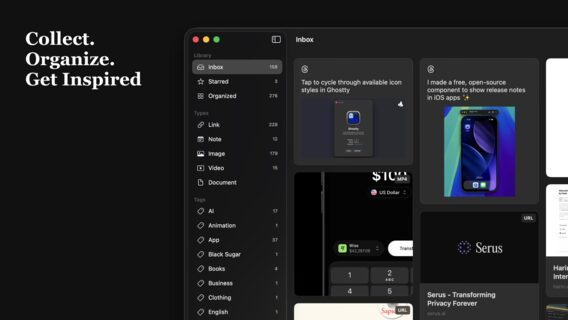
UI/UX designer Artem Nosenko, who also works on Monobank interfaces at Fintech Band, created Quark, an application for saving and organizing links, notes, quotes, images, videos, and PDFs from various sources.
UI/UX designer Artem Nosenko, who also works on Monobank interfaces at Fintech Band, created Quark, an application for saving and organizing links, notes, quotes, images, videos, and PDFs from various sources.
As a UI/UX designer with over 15 years of experience, Artem sought to create a single, reliable and cross-platform knowledge base that he himself lacked in his daily work to store and organize various materials for inspiration.
"Not finding a tool that would fully meet my needs, I started making Quark the way I wanted to use it: native to Apple, saves everything (links, notes, images, videos, documents, quotes), works offline and synchronizes via iCloud, without other people's servers. The name is also not accidental: quark is the smallest particle of matter. Similarly, each saved element in the application is like an atom of a personal knowledge base and inspiration, which make up something more," Artem Nosenko told dev.ua.
How Quark works
Quark is a native app for Apple devices that allows you to store and organize various content in one place with synchronization between macOS, iOS, and iPadOS using iCloud.
The idea of the application, which the author talks about on LinkedIn, is to store links from different platforms (X, Reddit, YouTube, LinkedIn, Pinterest, Telegram, Instagram, Bluesky, Threads) in the form of identical neat cards with previews, text, and media, without unnecessary visual noise.
In addition to links, Quark lets you save notes with Markdown support, citations in plain text, and drag and drop images, PDFs, and videos directly from the Finder. Your library syncs across devices via iCloud—no third-party accounts, servers, or tracking. Available on iPhone, iPad, and Mac, the app is free for up to 50 items on a single device; the full Quark Pro version removes this limitation and unlocks cross-device syncing.
Pinterest videos play directly within the card, without going to the browser, and media in cards is now stretched to the full width to make the saved feed look cleaner.
The entire library is synchronized between iPhone, iPad, and Mac via iCloud — without third-party accounts, servers, or tracking. Since July 1, the application has been fully localized in Ukrainian — the entire library, all content types, and every section of the interface have been translated. The free version is limited to 50 library items on one device; Quark Pro removes this limitation and opens up cross-device synchronization.
Separately, there is a discount for the Ukrainian App Store as a sign of support: $0.99 per month or $7.99 per year.
Quark was created using Claude artificial intelligence. At the same time, Artem did not draw the interface in Figma, but designed it directly in the code inside Xcode (starting with version 26.3 with Agentic Coding support). He used Figma only for related tasks: creating an icon for Icon Composer, preparing screenshots for the App Store, and preparing marketing materials.
First results and plans
The Quark app launched in spring 2026 on iPhone, iPad, and Mac without an advertising budget or third-party servers, as it is the author's personal pet project with minimal costs (only for the domain, Claude Max subscription, and Apple developer account). Despite a quiet organic launch, Quark is already bringing in its first paid subscriptions
The project is already demonstrating a rapid pace of development: in less than three months since its release, the developer has already released 7 technical updates.
The main vector of Quark development is maximum native integration into the Apple ecosystem, so that the application feels like a part of the operating system. The most important next step is the implementation of the Share Sheet function (the "Share" menu) for instant saving of content from any applications. In the future plans - the creation of extensions for browsers, widgets, actions in Shortcuts and support for Spotlight search.