Telegram users can now write texts using an AI editor and create their own bots
Telegram introduced a number of updates: an AI editor, powerful polls, Live Photo, bots for controlling bots, a document scanner, and more.


Telegram introduced a number of updates: an AI editor, powerful polls, Live Photo, bots for controlling bots, a document scanner, and more.
Telegram introduced a number of updates: an AI editor, powerful polls, Live Photo, bots for controlling bots, a document scanner, and more.
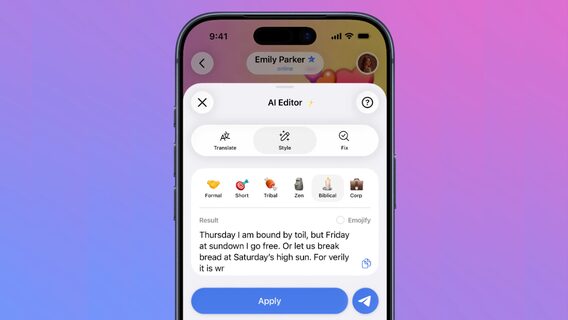
The notification panel now has a built-in editor that can instantly correct grammar, rewrite text in a different style, or translate it into another language — all powered by open-source AI models.
The text editor offers different styles such as Formal, Short, Tribal, Corp, Zen, Biblical, and Viking. You can add a style while translating text.
“The text editor uses the Cocoon network to provide users with complete privacy. Requests are processed in a confidential environment with zero access to user data,” the messenger says in a statement.
To use the AI editor while writing a message, you need to tap the "Ai" icon, which will appear above the "Send" button when you enter more than 3 lines of text.
Here's what you can do now:
Telegram now natively supports Live Photos on iOS and Motion Photos on Android, so users can send looping photos that can be viewed in any Telegram app.
The sender can choose from 3 different styles in the media editor: Live plays the photo once when opened, Loop plays continuously, and Pendulum plays back and forth in a circle.
To send a Live Photo, click the Live button in the top corner of the media editor and choose a style.
Users can now create their own personalized bots with just a few taps. With the latest update to the Telegram Bot API, bots can create and manage other bots on your behalf.
“This enables anyone to use AI-powered bots to easily develop and launch their own bot without the need for programming,” the company explained.
Now in Telegram for iOS, users can create scans of documents using their phone's camera, as well as combine multiple images into one file.
Document Scanner instantly removes the background, crops the image, and converts it to PDF. While scanning, you can tap the image to make manual adjustments—like changing the borders, adding a filter, or rotating the image.
To scan a document, open the attachment menu and select File > Scan Document.
Messenger provides a platform for independent developers to create third-party versions of the Telegram app. Users of such third-party apps now see a new security risk warning in their profiles, letting others know that messages sent to them may be less secure.