Хочете будувати кар’єру в Data Science та AI? Vodafone Big Data Lab відкриває новий набір —>
Наталя ХандусенкоStartup
10 November 2026, 17:55
2026-11-10
A Ukrainian IT guy has developed a free extension called ChatDataMask, which hides personal data of candidates and clients from ChatGPT, Claude and Gemini
Ukrainian developer Andriy Kozak has created a browser extension called ChatDataMask that allows for the safe use of artificial intelligence in recruiting, legal, and analytics. The tool automatically masks private information before the text reaches the AI platform's servers.
Ukrainian developer Andriy Kozak has created a browser extension called ChatDataMask that allows for the safe use of artificial intelligence in recruiting, legal, and analytics. The tool automatically masks private information before the text reaches the AI platform's servers.
From routine recruiting to the issue of confidentiality
The idea to create ChatDataMask came to Andriy during his own practice of hiring teams, when he was faced with a large amount of routine work and the risks of candidate data leakage.
"When I was selecting candidates for the team, resumes, interviews, and feedback took a lot of time. Today, ChatGPT does a significant part of this work. But every time a resume goes into a chat, the name, phone number, email, and salary of a person who doesn't even know about it are sent along with it," said Andriy Kozak.
To solve this problem, the developer created a Chrome extension that works on the local-first principle. Anonymization, tokenization, and subsequent recovery occur exclusively locally in the user's browser - the information does not go to AI models for training or to any third-party servers.
How ChatDataMask works: 40 seconds to mask
As an example, the developer showed a real scenario of using the tool in the work of a recruiter.
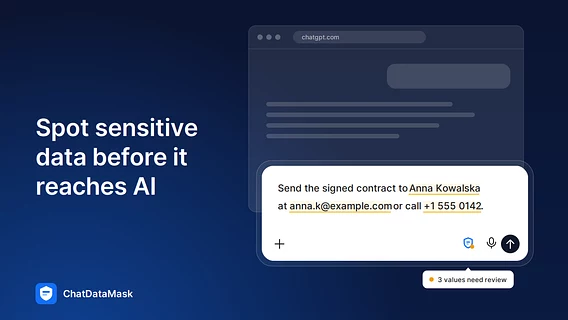
Text analysis: the user inserts a resume or screening notes into the chat — the extension automatically highlights personal data (names, contacts, salary, etc.).
One-click masking: after clicking the Mask 5 values button, the tool replaces real data with tokens (for example, instead of "Jane Smith", ChatGPT sees [NAME_1]).
Response generation: artificial intelligence processes anonymous text and creates a conclusion for the hiring manager without losing context.
Data recovery: With one click, the user copies the AI response, where the tokens are automatically replaced back with real data for insertion into the working document.
If a user accidentally clicks the send button on a message with unmasked data, ChatDataMask will stop the process and offer to hide sensitive information first.
What exactly does the tool recognize and hide?
The extension is designed to protect against data leakage and supports the requirements of European standards GDPR and EU AI Act.
ChatDataMask recognizes and anonymizes:
personal and contact data: full names, phone numbers in international format (based on libphonenumber-js), e-mail, home addresses, passport numbers, ID and tax numbers (TIN/VAT);
financial details: bank card numbers, IBAN accounts, SWIFT codes and crypto wallet addresses (Bitcoin, Ethereum and other EVM networks);
technical information: IP and MAC addresses, API keys, access tokens.
Platform support and availability
The extension is completely free. The interface and data recognition module support five languages: Ukrainian, English, Polish, German, and Spanish.
ChatDataMask has direct integration with ChatGPT, Claude, and Google Gemini interfaces (a special protective shield is displayed in the input field). For other services, such as Microsoft Copilot, masking and reverse deanonymization are performed via a convenient browser sidebar.
You can install ChatDataMask from the Chrome Web Store at this link .