Наталя ХандусенкоWork
13 October 2026, 14:10
2026-10-13
A Ukrainian developer has created a free tool that automatically fills out job applications in 9 languages. How Job Form Filler works and what makes it special
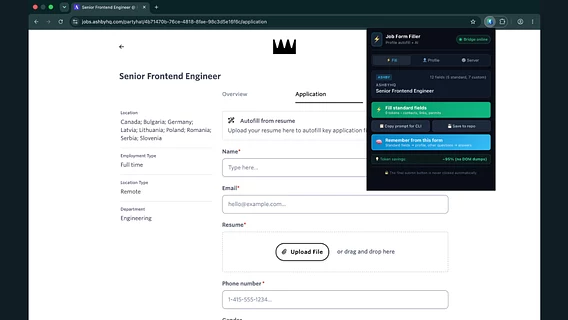
Ukrainian Tech Lead and Full-Stack Engineer Dmytro Bilukha developed the Chrome extension Job Form Filler. The tool automates filling out standard forms during job searches and guarantees complete privacy of user data. There is also the possibility of connecting AI via MCP.
Ukrainian Tech Lead and Full-Stack Engineer Dmytro Bilukha developed the Chrome extension Job Form Filler. The tool automates filling out standard forms during job searches and guarantees complete privacy of user data. There is also the possibility of connecting AI via MCP.
According to the IT professional, the idea to create a plugin arose because of the routine that candidates face: the need to manually enter the same contact and professional data on different recruiting platforms every time.
How Job Form Filler works
The extension supports work with popular ATS systems and platforms, including Ashby, Greenhouse, Lever, Workable, and LinkedIn Easy Apply.
Main functionality and features of the tool:
One-time setup: the user fills out their profile (or imports it) once and adds a resume.
One-click autofill: the tool substitutes name, contacts, references, work permit status, notice period, answers to EEO questions, and attaches a resume file.
Multilingualism: The tool supports 9 languages (including Ukrainian, English, Polish, German, French, Spanish, Italian, Portuguese, and Dutch). The developer emphasized that Russian is deliberately not supported.
Visual control: the extension highlights filled fields and notifies you about which items are left blank.
AI connectivity via MCP and absolute privacy
The main technical feature of Job Form Filler is the ability to integrate an AI assistant (Claude Desktop or Claude Code) via the MCP (Model Context Protocol) protocol. Unlike most analogues, the assistant analyzes only the concise context and those questions that were left blank, and does not read the entire DOM code of the page or screenshots. This allows you to significantly save tokens when processing non-standard questions.
At the same time, Dmytro Bilukha notes conscious limitations and security principles. The tool does not have a function of automatically sending questionnaires - the user himself has to check the data and click the "Submit" button. Questions about motivation and behavioral cases ("tell me about a case...") are not generated by AI in principle - they are always returned to the user for a personal answer.
All profile and resume data is stored exclusively in the user's browser. The plugin has no accounts, trackers, or analytics, and the developer receives no information.
Accessibility
Job Form Filler is a completely free and open source tool. You can download the extension from the Chrome Web Store and view the project code on GitHub .