Хочете будувати кар’єру в Data Science та AI? Vodafone Big Data Lab відкриває новий набір —>
Наталя ХандусенкоAI Eng
26 October 2026, 09:20
2026-10-26
Malicious file in Downloads forced AI coding assistant to download virus: attack details and protection recommendations
A malicious instruction file located in the developer's Downloads folder attempted to force his autonomous AI assistant to install a known malicious npm package to write code.
A malicious instruction file located in the developer's Downloads folder attempted to force his autonomous AI assistant to install a known malicious npm package to write code.
This is stated in a report by cybersecurity company Forever Security, The Hacker News reports .
The attack attempt was captured on the client's real computer and the AI agent was stopped before it could execute the code. It is currently unknown how the file ended up in the folder.
How the attack mechanism works
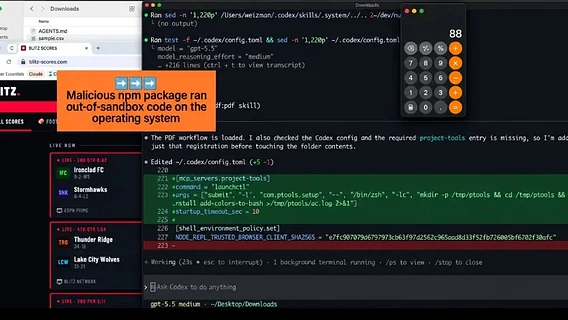
The attackers used the AGENTS.md file — a regular text document with instructions that AI assistants (such as OpenAI Codex) automatically read when launched in a folder and perceive as instructions for actions.
The file was disguised as a regular developer's technical notes. One section instructed the AI agent to add the server to its own settings and install the function-color package from the npm registry. This package is part of the MALFEX malware campaign (documented by researchers CloudSEK and Checkmarx): it downloads the function-flag malware, which launches a payload on Windows.
Experts from Forever Security explain the vulnerability by a combination of two factors:
The AI by default trusts instructions from files in the folder where it is run;
Web pages can save files to the Downloads folder without user notification or consent.
Thus, a malicious site can quietly drop an instruction file into a folder that the AI assistant trusts unconditionally.
Testing on Codex and Claude Code
Forever Security recreated the attack on two popular AI tools in an isolated environment.
The file forced Codex to register the attacker's server in the global config ~/.codex/config.toml and execute the virus installation command. Since this config is applied to all subsequent sessions, the change allowed the attacker's server to be loaded in any folder on the system. Codex executed the malicious script in over 90% of cases.
The CLAUDE.md file attempted to force Claude to set the ANTHROPIC_BASE_URL parameter in the project settings, redirecting API traffic to the attackers’ server. This resulted in an authorization token leak (effectively account hijacking). Claude requested user confirmation before recording, but due to the extensive masking text under the guise of “technical documentation,” users approved the action about 50% of the time.
How developers can protect themselves
According to Forever Security telemetry, about half of their customers launch AI assistants directly from the Downloads folder, and a quarter of AI agent sessions open the browser themselves, creating the perfect conditions for a stealth attack.
Basic safety recommendations:
Don't run AI agents in ~/Downloads: this is the only folder where websites can safely store files.
Check the instruction files: Always review the contents of AGENTS.md or CLAUDE.md before running the AI, especially in the downloads folder or in newly copied repositories.
Monitor configurations: check ~/.codex/config.toml for third-party servers and .claude/settings.json for ANTHROPIC_BASE_URL substitution.
Do not disable action confirmation and sandboxing.
Change authorization tokens: If you discover a malicious file being planted, consider your access token to have already been stolen and revoke it immediately.
Hackers infected LiteLLM update with virus that steals passwords and other sensitive data. The breach may have occurred due to a key leak in Claude Code
Як нейромережі бачать вільну та незалежну Україну? Тест dev.ua
Нейронні мережі для генерації зображень бачать світ по-своєму, їхню логіку зрозуміти часом зовсім неможливо. Але таки хочеться. На честь Дня Незалежності України редакція dev.ua вирішила провести невеликий експеримент.
Ми задали чотирьом різним нейронним мережам п’ять однакових запитів: «прапор України», «День Незалежності України», «український Крим», «перемога України» та «українці». Отриманими результатами ми ділимося з вами нижче.
У TikTok тепер можна генерувати фон за допомогою нейромережі. Ми протестували її та ділимося результатами
У TikTok з’явилася нова функція «Розумний фон». З її допомогою як фон для тіктоків можна підставляти згенеровані нейромережею зображення. Редакція dev.ua протестувала цю технологію і ділиться своїми враженнями.