5 free interactive games to help IT professionals develop UI mindfulness
This selection of games can be useful for QA, Frontend developers, product managers, and designers.


This selection of games can be useful for QA, Frontend developers, product managers, and designers.
This selection of games can be useful for QA, Frontend developers, product managers, and designers.
Software QA Engineer and mentor Anastasia Dyka has compiled a selection of free interactive games that will help you «train your eye» to spot small errors, improve your aesthetic sense, and your sense of observation.
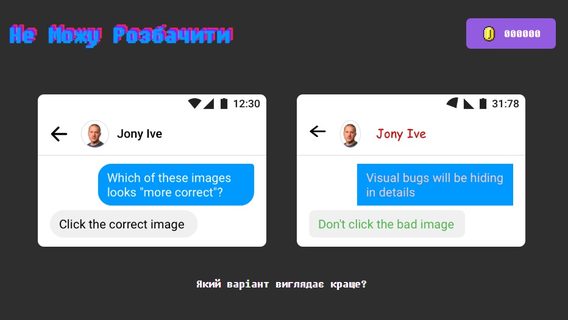
The game has three difficulty levels: beginner, intermediate, and expert. Players choose the correct option from two interfaces.
The game will help you practice attention to detail — padding, alignment, typography.
«After a few rounds, you notice things you just didn’t see before.»
«It’s ideal not only for designers, but also for QA, developers, and content specialists,» Anastasia noted about the benefits of the game.
In the comments, Java Developer Alex Mikhailov noted that the simulator is great, but difficult. To which the author of the selection added: «The level gradually increases there — from simple to complex. But yes, you have to be very careful.»
This is a mini game built around UX/UI tasks. It will help you improve your logic, interface analysis, patterns, and UX errors.
The game’s highlight is gamified learning with progress, leaderboards, and a dopamine rush.
«UX intuition is a superpower that will come in handy for anyone who creates or tests digital products,» added Anastasia.
Gram contains over 15 tasks to identify inaccuracies in layouts. It will help develop visual attention and analytical thinking.
Its peculiarity is that every decision affects the overall score — it’s like playing a visual quest.
«Ideal for those who love logic, challenges, and the excitement of 'guessing where the bug is,'» the IT specialist explained.
Players guess whether the object is actually in the center. This will help train symmetry, accuracy, and an «eye» for proportions.
«Incredibly simple, but addictive! Even devs start to „see“ when something is a little off in the interface,» Anastasia noted.
In the game, you need to draw given shapes with Bezier curves using the Pen Tool.
This will help improve accuracy, coordination, and vector geometry.
Therefore, the game is especially suitable for those who want to learn how to work with curves in Figma, Illustrator, or SVG.
«Pen Tool only seems scary until you play this game. Then everything falls into place,» the IT professional added.