An Odessa resident developed the Wintodo task manager — a free native replacement for Microsoft To Do, which is being shut down in June
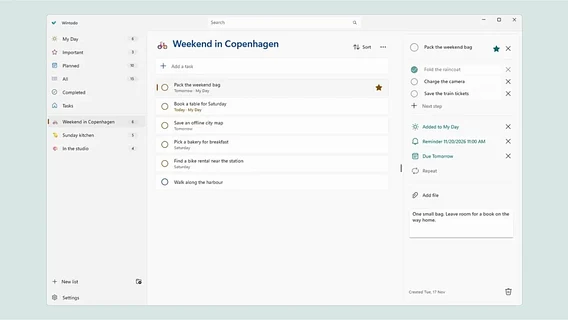
Product manager from Odessa, Danylo Dermenzhy, has released the Wintodo application in the Microsoft Store — a free native task manager on WinUI 3 for Windows 11. The project was created as an alternative to Microsoft To Do, which Microsoft plans to discontinue support for in June 2027.
Product manager from Odessa, Danylo Dermenzhy, has released the Wintodo application in the Microsoft Store — a free native task manager on WinUI 3 for Windows 11. The project was created as an alternative to Microsoft To Do, which Microsoft plans to discontinue support for in June 2027.
As Danylo said on Reddit, he used Microsoft To Do for 6–7 years, but over time the service support deteriorated, and he didn’t want to switch to web versions or Electron clients. Since Microsoft doesn’t offer a native replacement for personal accounts (work accounts will be transferred to the web version of Planner), the developer created his own client on WinUI 3 and .NET 10 Native AOT for x64 and ARM64 architectures.
Functionality and synchronization
Wintodo recreates the familiar Microsoft To Do workflow — My Day, Important, Scheduled, lists and groups, subtasks, repetitions, attachments, full keyboard navigation, and undo (Ctrl+Z). At the same time, the program is not tied to the Microsoft cloud:
the database is stored in SQLite (the program works offline without an account), there is import of lists from Microsoft To Do via Graph API in read mode, as well as import and export of .ics files;
Work with Nextcloud Tasks, Radicale, and Fastmail is supported, so tasks can be synchronized with Apple Reminders or the Tasks.org Android app.
Technical details and performance
The main engineering task was full compatibility with Native AOT without using reflection:
instead of EF Core and reflective JSON, pure SQLite + FTS5 with manual mappers was used;
implemented own RFC 5545 VTODO / RRULE parser and CalDAV client (passwords are stored in Windows PasswordVault);
for smooth scrolling of large lists, a custom IObservableVector + SequenceDiff has been created, which allows you to avoid redrawing the ListView tree;
Notifications work via ScheduledToastNotification and arrive even when the application is completely closed without background services.
According to the author's measurements on Windows 11×64, Wintodo consumes about 87 MB of RAM (18 threads versus 32 in the UWP version of Microsoft To Do), the MSIX package takes up 56.6 MiB (Wintodo.exe itself — 21.3 MiB), scrolling through 10,000 tasks maintains a stable 119 fps, and queries against this database are executed in 1.5–2.7 ms.
When writing the code, Danylo used AI models (GPT 6.1/6.2 and Gemini 4), but he performed the architecture, optimization for Native AOT, testing in Hyper-V, and publishing to the Microsoft Store manually.
Distribution terms and plans
The app is free, ad-free, and telemetry-free, and its source code is available on GitHub under the Source-Available license. You can download the app from the Microsoft Store .
In the future, the developer plans to add optional paid cloud synchronization based on its company's infrastructure and release mobile applications for iOS and Android based on Kotlin Multiplatform (KMP).
A developer from Kyiv created a mix of a social network and a task tracker: how the AI application Mastermindy works, where people can develop and achieve goals together